Stream Processing
Process data in motion with SoliDB's native stream processing capabilities. Define streams, apply windowing functions, and analyze real-time data using SDBQL.
Window results are automatically materialized into queryable _streams:<name> collections.
What are Streams?
Streams in SoliDB allow you to define continuous queries that process data as it arrives. Unlike standard queries that run against a snapshot of stored data, streams operate on the flow of data, enabling real-time analytics, aggregation, and monitoring.
1 Creating Streams
Use the CREATE STREAM statement to define a new stream. A stream is defined by a name and a query that specifies the data source and transformation.
CREATE STREAM high_value_orders AS
FOR order IN orders
FILTER order.amount > 100
WINDOW TUMBLING (SIZE "1m")
RETURN order
2 Windowing
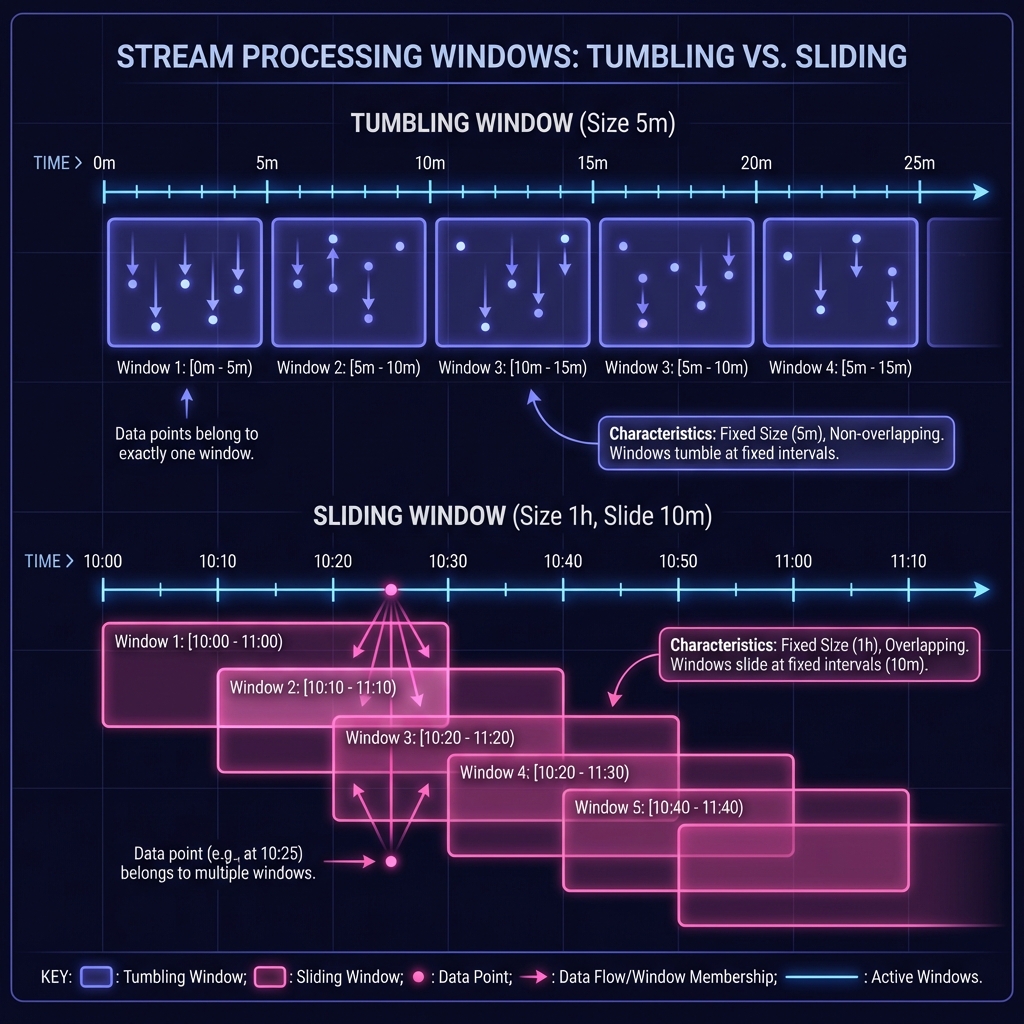
Streams often require grouping data into time-based buckets called windows. SoliDB supports TUMBLING and SLIDING windows.
Choosing the right window type depends on whether you need distinct, non-overlapping analysis (Tumbling) or continuous, overlapping analysis (Sliding).
Tumbling Window
Fixed-size, non-overlapping time intervals.
Tumbling windows segment the data stream into distinct contiguous blocks. Each data point belongs to exactly one window.
Use case: "Count orders per minute", "Hourly summaries".
WINDOW TUMBLING (SIZE "5m")Sliding Window
Overlapping time intervals that slide by a specified duration.
Sliding windows "slide" over the data stream. A window moves forward by a specific "slide" interval. A single data point can belong to multiple overlapping windows.
Use case: "Moving average of last hour, updated every minute".
WINDOW SLIDING (SIZE "1h")3 Consuming Results
Streams are computed in the background, but their primary power is driving real-time applications. Use the WebSocket live_query command to subscribe to stream results as they are emitted.
WebSocket Protocol
{
  "type": "live_query",
  "query": "FOR item IN high_value_orders RETURN item"
}
The server will push new results to the client as soon as they are processed by the stream window.
4 Managing Streams
| Action | Example | Description |
|---|---|---|
| List Streams | solidb.streams.list() | Retrieve all active streams. |
| Stop Stream | solidb.streams.stop("name") | Stop a running stream task. |
5 Stream Results
Processed window results are automatically written to a dedicated output collection named _streams:<stream_name> (scoped to your database).
These collections are regular document collections — you can query them with SDBQL, subscribe to live changes, or use them as sources for other streams/views.
FOR event IN _streams:high_value_orders
  FILTER event.window_end > @since
  RETURN event
This makes streams a practical foundation for continuous aggregates and real-time materialized views.