Columnar Storage
SoliDB includes a specialized columnar storage engine optimized for analytics, reporting, and read-heavy workloads. It features column-oriented storage, aggressive compression, and fast aggregations.
Overview
Unlike traditional row-oriented collections where data is stored document-by-document, columnar collections store data column-by-column. This architecture is vastly superior for analytical queries where you typically access only a few columns but scan millions of rows.
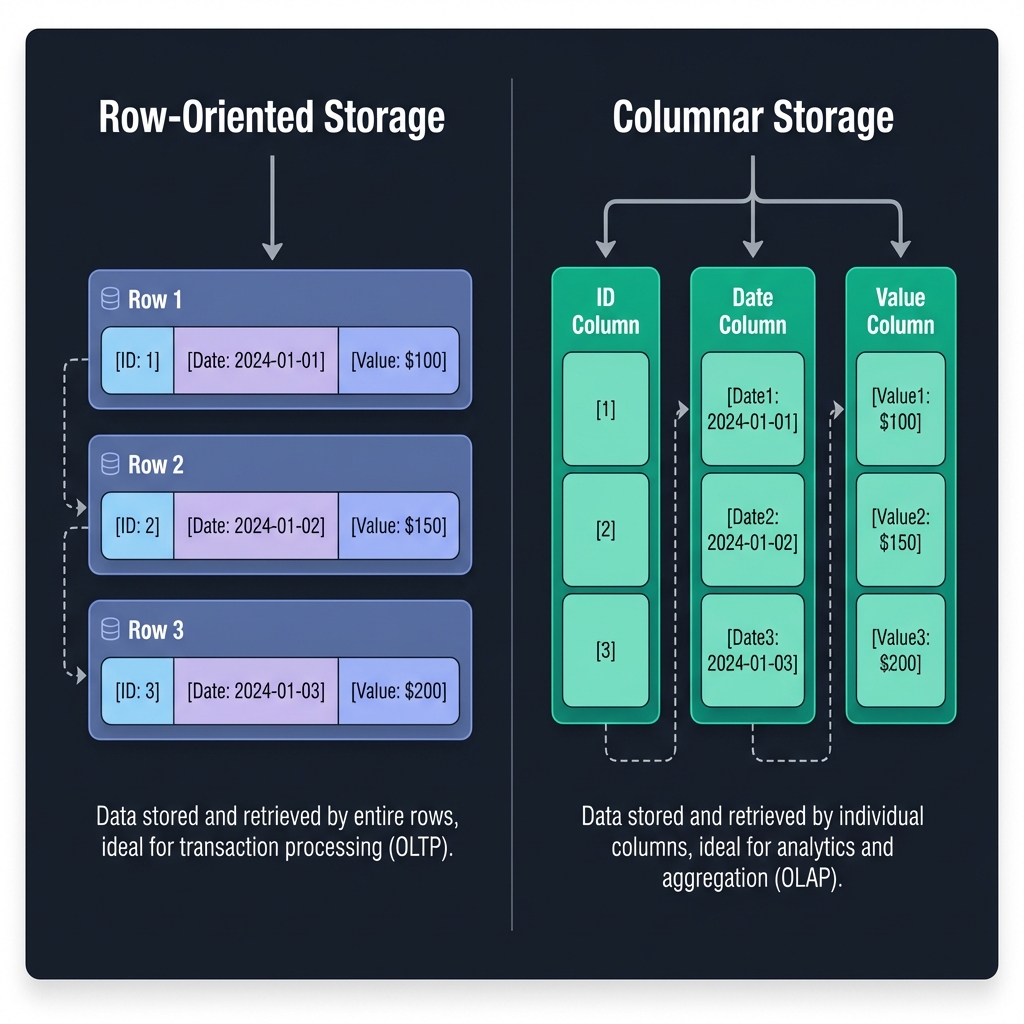
LZ4 compression often achieves 2-4x better storage efficiency than row storage.
Read only the columns you need. IO is reduced proportionally to the number of columns skipped.
Efficient GROUP BY and aggregation operations (SUM, AVG, MIN, MAX).
Explicit schemas with supported types: Int64, Float64, String, Bool, Timestamp, Json.
Columnar vs. Standard Time Series
SoliDB offers two distinct approaches for handling time-based data. Choosing the right one depends on your ingestion and query patterns.
| Feature | Standard Time Series | Columnar Storage |
|---|---|---|
| Storage Layout | Row-oriented (Log Structured) | Column-oriented (Chunked) |
| Best For | High-throughput ingestion, real-time monitoring, simple retrieval | Complex analytics, reporting, aggregations over large history |
| Ingestion | Fast individual inserts & appends | Favors batched bulk inserts |
| Retention | TTL & Pruning supported | Manual management |
| Primary Ops | INSERT, GET range |
GROUP BY, SUM, AVG |
Creating Collections
Columnar collections require an explicit schema definition at creation time. This allows the engine to optimize storage layout.
/_api/database/:db/columnar
{
  "name": "server_metrics",
  "compression": "lz4",
  "columns": [
    { "name": "timestamp", "type": "TIMESTAMP" },
    { "name": "host", "type": "STRING" },
    { "name": "cpu_usage", "type": "FLOAT64" },
    { "name": "requests", "type": "INT64" },
    { "name": "metadata", "type": "JSON", "nullable": true }
  ]
}Inserting Data
Insertions should ideally be batched for maximum performance. The engine automatically handles decomposition into columns and compression.
/_api/database/:db/columnar/:collection/insert
{
  "rows": [
    {
      "timestamp": "2024-01-01T10:00:00Z",
      "host": "us-east-1a",
      "cpu_usage": 45.2,
      "requests": 1024
    },
    {
      "timestamp": "2024-01-01T10:00:01Z",
      "host": "us-east-1a",
      "cpu_usage": 48.1,
      "requests": 1150
    }
  ]
}
Aggregations
Perform fast aggregations on single columns or with grouping. The engine reads only the necessary columns and uses streaming processing for minimal memory footprint (O(1)).
Simple Aggregate
Calculate metrics across the entire collection.
FOR c IN cpu_logs
  COLLECT AGGREGATE
    avg_usage = AVG(c.usage)
RETURN { avg_usage }{
"column": "usage",
"operation": "AVG"
}Group By
Group results by one or more columns.
FOR r IN requests
  COLLECT
    host = r.host
  AGGREGATE
    total = SUM(r.count)
RETURN { host, total }{
"column": "count",
"operation": "SUM",
"group_by": ["host"]
}Time Bucket
Group by fixed time intervals (e.g., 1h, 5m). Optimized for time-series.
FOR m IN metrics
  COLLECT
    time = TIME_BUCKET(m.ts, '1h'),
    host = m.host
  AGGREGATE
    avg_cpu = AVG(m.cpu)
RETURN { time, host, avg_cpu }{
"column": "cpu",
"operation": "AVG",
"group_by": ["TIME_BUCKET(ts, '1h')", "host"]
}
// Note: SDBQL is recommended for thisSupported Operations
Filtering & Querying
Columnar collections are a first-class SDBQL data source: FOR reads
them like any other collection, so FILTER,
SORT, LIMIT, joins and subqueries
all work, and you can combine columnar data with documents, edges and vector search in a single query.
FOR m IN cpu_logs
  FILTER m.host == "us-east-1a"
  SORT m.timestamp DESC
  LIMIT 100
RETURN { ts: m.timestamp, cpu: m.cpu_usage }FOR m IN cpu_logs
FOR h IN hosts
FILTER h._key == m.host
RETURN { cpu: m.cpu_usage, region: h.region }Performance note. An SDBQL
FILTER is applied after the rows are read, so it does not yet benefit from column pruning
or index-aware chunk skipping. For a selective filter over a large collection, the REST endpoint below
still reads less. Pushdown is planned.
The REST endpoint remains available and pushes the filter into the storage layer, applying it before projection to minimize IO:
/_api/database/:db/columnar/:collection/query
{
  "columns": ["timestamp", "cpu_usage"],
  "filter": {
    "column": "host",
    "op": "EQ",
    "value": "us-east-1a"
  },
  "limit": 100
}
Filter Operators
Advanced Indexing
SoliDB supports advanced columnar index types to accelerate specific query patterns. Indexes are created independently of the data and can be added or removed at any time.
Bitmap Index
Best for low-cardinality columns (e.g., status, category, boolean flags). Uses highly compressed bitsets (LZ4) to perform blazing fast equality and IN lookups.
"bitmap"
Ideal for: < 100 distinct values
Min/Max Index
Best for range queries on sorted or semi-sorted data (e.g., timestamps, sequential IDs). Divides data into chunks and skips entire blocks that don't match the filter (Partition Pruning).
"minmax"
Overhead: Ultra-low (~0.1%)
Hash Index
Best for exact match queries (equality) on high-cardinality columns (e.g., UUIDs, user IDs). O(1) lookups but does not support range queries.
"hash"
Fastest for: Equality
Bloom Filter Index
Best for probabilistic membership testing. Checks if a value might exist in a chunk before scanning it. Useful for skipping chunks for equality checks on unique or semi-unique columns.
"bloom"
No False Negatives
Sorted Index (Default)
Standard index storing a sorted list of values pointing to list of Row IDs. Good general purpose performance for both equality and range queries on high-cardinality data.
/_api/database/:db/columnar/:collection/index
{
  "column": "status",
  "index_type": "bitmap"
}
IoT & Sensor Data
Store high-frequency sensor readings from thousands of devices. Use Time Bucket aggregations to downsample data for visualization (e.g., convert 1-second resolution to 5-minute averages).
FOR s IN sensors
  FILTER s.region == 'us-east-1'
  COLLECT
    bucket = TIME_BUCKET(s.ts, '5m'),
    device = s.device_id
  AGGREGATE
    avg_temp = AVG(s.temperature),
    max_temp = MAX(s.temperature),
    avg_humidity = AVG(s.humidity)
  RETURN {
    time: bucket,
    device,
    temp: avg_temp,
    max: max_temp,
    humidity: avg_humidity
  }
Financial Analytics
Analyze trade data to produce OHLCV (Open, High, Low, Close, Volume) candles and VWAP (Volume Weighted Average Price) efficiently.
FOR t IN trades
  COLLECT
    bucket = TIME_BUCKET(t.ts, '1m'),
    symbol = t.symbol
  AGGREGATE
    open = FIRST(t.price),
    high = MAX(t.price),
    low = MIN(t.price),
    close = LAST(t.price),
    volume = SUM(t.size),
    vwap_num = SUM(t.price * t.size)
  RETURN {
    time: bucket,
    symbol,
    open, high, low, close, volume,
    vwap: vwap_num / volume
  }