Distributed Cluster
SoliDB is built for horizontal scale. Spin up a leaderless, shared-nothing cluster in seconds with zero configuration overhead, thanks to built-in port multiplexing.
Architecture
Sharding Strategy
Data is partitioned across nodes using Consistent Hashing. Each document is assigned to a specific shard based on its key, and shards are distributed evenly across the cluster.
Replication & Fault Tolerance
Every shard has a primary owner and N replicas. Write operations are consistent, while read operations can be tuned for consistency or availability.
Automatic Mesh Topology
Failing Nodes & Recovery
Clusters are dynamic environments. When a node fails, SoliDB automatically detects the outage and promotes replicas to maintain availability.
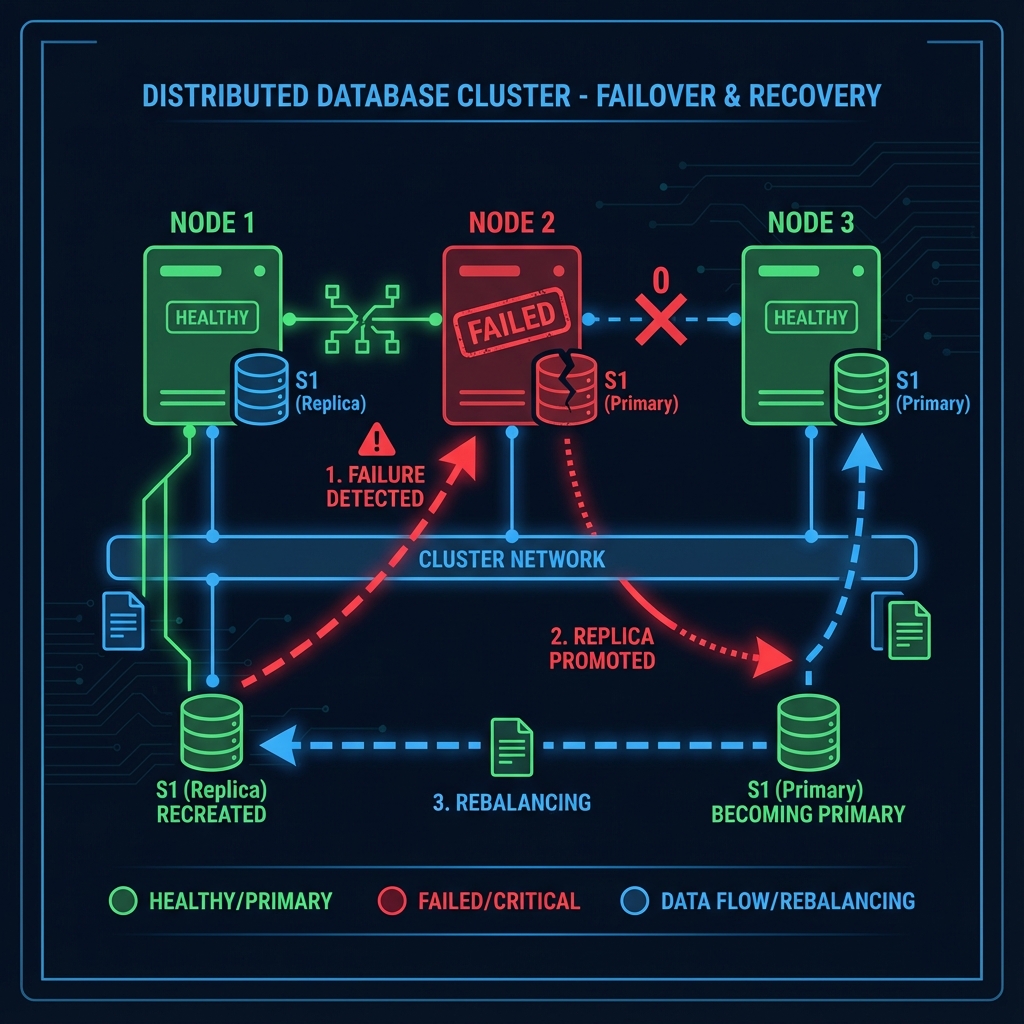
Failure Detected
Members exchange heartbeats every 500ms. A node is marked Suspected then Dead after 3 missed beats.
Replica Promotion
For affected shards, an available Replica is immediately promoted to Primary to accept writes.
Rebalancing
New replicas are created on healthy nodes to restore the replicationFactor.
Manual Rebalancing
When a node rejoins or a new node is added, trigger a rebalance to distribute load evenly.
POST /_api/cluster/rebalance
3-Node Local Cluster
RecommendedStart a fully functional, fault-tolerant cluster on your local machine. SoliDB uses Single-Port Multiplexing by default, so you don't need to manage separate ports for replication.
Bootstrap Node
solidb --port 8081 --data-dir ./data1
Join Node 2
solidb --port 8082 --data-dir ./data2 --peer 127.0.0.1:8081
Join Node 3
solidb --port 8083 --data-dir ./data3 --peer 127.0.0.1:8081
curl http://localhost:8081/_api/health
Production Security
Never deploy a public cluster without authentication. SoliDB uses a shared-secret model with HMAC-SHA256 challenge-response to prevent unauthorized node joins.
1 Generate Secret
Creates a high-entropy keyfile.
2 Start Node
Apply the same keyfile to all nodes.
The keyfile also exempts internal traffic
Every endpoint is rate limited per client IP (see Built-in Protections), and a sharded write forwards one HTTP request per document — from a single peer address. Requests carrying a valid X-Cluster-Secret bypass the limiter, so shard forwarding, healing and rebalancing are never throttled. A node started without a keyfile has no way to prove a request is internal: its peers get throttled like any external client.
Inter-node traffic is plaintext
The sync and cluster transports do not speak TLS. Run them on a private network or a tunnel. Native TLS (--tls-cert) is safe to enable on a clustered node — the multiplexed listener only handshakes with clients that offer TLS — but never set SOLIDB_TLS_REQUIRE=1 on one: it drops every peer connection. See Transport Security.
CLI Reference
Usage: solidb [OPTIONS]

Network & Cluster:
  -p, --port                  Listen port (API & Replication) [default: 6745]
      --peer                 Join cluster via peer (e.g. 10.0.0.5:6745)
      --replication-port      Override replication port (Disable Multiplexing)
      --keyfile               Path to auth secret file

System:
  -d, --daemon                      Run in background (Daemon mode)
      --data-dir              Database storage location [default: ./data]
      --log-file              Log output path
      --pid-file              PID lock file